


Chào mừng quý vị đến với website của trường THCS Tân Khai
Nếu chưa đăng ký, hãy nhấn vào chữ ĐK thành viên ở phía bên trái, hoặc xem phim hướng dẫn tại đây
Nếu đã đăng ký rồi, quý vị có thể đăng nhập ở ngay phía bên trái.
CODE TẠO KHUNG ẢNH ONLINE

Nguồn: st
Người gửi: Vũ Thị Mai (trang riêng)
Ngày gửi: 13h:57' 17-07-2013
Dung lượng: 711.7 KB
Số lượt tải: 19
Mô tả:
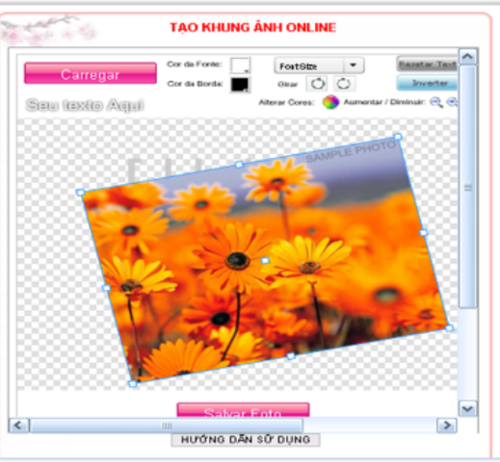
CODE CHÈN VÀO KHỐI CHÍNH:
<iframe src="http://www.scrapee.net/frames-embed.php?lang=pt"
style="border: 1px solid rgb(153, 153, 153);" width="520" height=
"530"></iframe><center>
<div style=
"font-family: Verdana,Geneva,Lucida,'Lucida Grande'; font-style: normal; font-variant: normal; font-weight: normal; font-size: 12px; line-height: normal; font-size-adjust: none; font-stretch: normal; -x-system-font: none; margin-bottom: 3px;">
<input value="HƯỚNG DẪN SỬ DỤNG" style=
"background:; margin: 0px; padding: 0px; width: 165px; font-size: 12px;"
onclick=
"if (this.parentNode.parentNode.getElementsByTagName('div')[1].getElementsByTagName ('div')[0].style.display != '') { this.parentNode.parentNode.getElementsByTagName('div') [1].getElementsByTagName('div')[0].style.display = ''; this.innerText = ''; this.value = 'CLICK ĐÓNG LẠI'; } else { this.parentNode.parentNode.getElementsByTagName('div') [1].getElementsByTagName('div')[0].style.display = 'none'; this.innerText = ''; this.value = 'HƯỚNG DẪN SỬ DỤNG'; }"
type="button"></div>
<div style=
"border: 0px inset ; margin: 0px; padding: 0px; min-height: 10px;">
<div style="display: none;">
<div align="left"><br>
<font size="3" color="#0000FF">1)Carregar (upload ảnh của mình
lên)</font><br>
<font size="3" color="#0000FF">2) Chọn khung bên tay phải và thêm khung mới</font><br>
<font size="3" color="#0000FF">3)Chọn icon ở dưới và thêm icon </font><br>
<font size="3" color="#0000FF">4) Thêm chữ và màu chữ (phía trên)</font><br>
<font size="3" color="#0000FF">5) Salvar foto (Lưu lại )</font><br></div>
</div>
</div>
</center>
Các ý kiến mới nhất